
Table of Contents
- What Does an F2 Fault Mean?
- Common Causes
- Diagnosing Which Component Is the Cause
- How to Troubleshoot
- A Summary of an F2 Fault
- FAQs
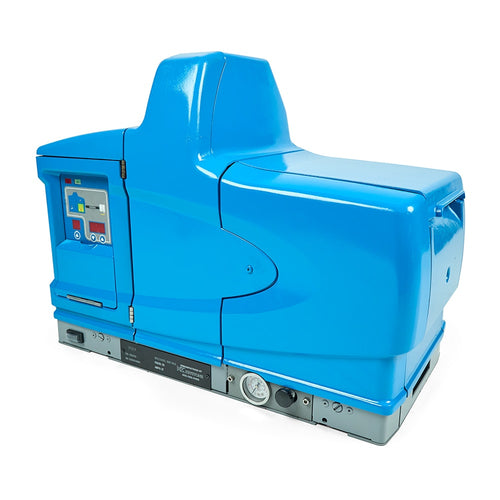
Facing downtime because of a Nordson® F2 fault code? If you are operating a ProBlue® 4, ProBlue® 7, ProBlue® 10, or ProBlue® 15 series glue machine, this is a common error. Fortunately, if you know what you are doing, this can be an easy fix.
To get you back up and running, our expert team shares common causes as well as step-by-step instructions on how to diagnose and fix a Nordson ProBlue F2 fault code.
What Does an F2 Fault Mean on a Nordson ProBlue?
A Nordson ProBlue F2 fault code is an alert that a heated component has fallen below the allowable temperature range established by the system's settings. Essentially, the system has detected that a component is colder than expected and will alert the operator with the F2 code on the system's display screen. An F2 fault code only indicates when a component is under temperature, not when it is over temperature.
Common Causes of a ProBlue F2 Fault
A Nordson melter F2 fault code indicates that the controller senses a lower-than-expected temperature in one of the system’s components. While an F2 fault describes what the controller detected, it doesn't necessarily mean that the component is under temperature. It could also be an issue with the controller or electrical components.
Because this is a broad error alert, there are multiple potential causes of an F2 fault code on a ProBlue melter, including:
- A heater that is not producing sufficient heat
- A damaged or failing resistance temperature detector (RTD) sensor
- Loose or damaged electrical connections
- A disconnected or failing hose or gun
- Damaged wiring
- Loss of heater power
- A problem with the melter's heater-control circuitry
- Environmental conditions causing excessive heat loss
In some cases, an F2 error is a minor operating issue that is easy to fix. In other cases, it is tied to a more serious equipment problem that needs to be addressed.
Diagnosing Which Component Is Causing the F2 Fault
The first step in troubleshooting an F2 fault on a Nordson glue machine is to identify which component is generating the alert. Depending on the system configuration, the affected component may be any of the following:
- Tank
- Manifold
- Hose
- Gun/applicator
Fortunately, the ProBlue displays additional information to help you identify which component is experiencing the problem when an F2 fault occurs. Look at the fault code as well as the component information. For example, if the system indicates an F2 code while identifying a particular hose, troubleshooting should begin with an inspection of that hose.
How to Troubleshoot a Nordson ProBlue F2 Fault
After identifying which component is at fault, you need to determine how extensive the problem is. A Nordson F2 fault on your display screen does not automatically mean that a part needs to be replaced. In some cases, simple adjustments may be all that is needed.
Follow the steps below to efficiently fix an F2 fault code on your Nordson ProBlue.
*Servicing should be performed by personnel with appropriate training and experience. Proper shutdown and safety procedures also need to be followed to avoid serious injury.
1. Determine Whether the Affected Component Is Actually Heating
After identifying which component is the source of the fault F2 error, the next step is to check the actual temperature on the component. If the component remains cold or significantly below its setpoint, there may be a genuine heating problem. If the component appears to be heating normally, but the controller reports an abnormally low temperature, the problem may be related to the RTD or temperature-sensing circuit.
2. Inspect Connections and Wiring
Before jumping to install a replacement hot melt part, inspect the affected component's electrical connections. A connection problem can interrupt either the heater circuit or the RTD circuit.
Look for any of the following:
- Loose connectors
- Damaged connector pins
- Burned connections
- Broken or pinched wiring
- A hose or gun that is not completely connected
3. Check the RTD and Temperature Reading
The RTD tells the ProBlue controller the temperature of the heated component. If the RTD provides an inaccurate reading, the controller may falsely display an F2 fault error on the hot melt system.
Refer to the Nordson manual for specific diagnostic procedures to test the RTD and troubleshoot any temperature-control problems.
4. Check the Heater Circuit
If the temperature reading appears accurate, but the component cannot reach or maintain its set temperature, the next question is whether the heater is receiving power and operating correctly.
You should check the following:
- Heater resistance
- Heater continuity
- Heater power
- TRIAC/control output
- Associated control components
The ProBlue manuals include separate diagnostic procedures for checking TRIAC operation and tank and manifold heater resistance.
5. Isolate the Component
If the F2 melter fault is related to a hose or gun, isolating the affected component can help determine whether the problem belongs to the accessory or the melter. If possible, substitute a component you know is functioning correctly to help determine whether the problem follows the hose, gun, or melter's control circuit.
6. Investigate the Melter's Control System
If the RTD, heater, wiring, and external heated component all appear to be working correctly, you should inspect the melter's electrical control system. Only qualified personnel should investigate the heater-control circuitry and other internal electrical components.
A Simple Way to Think About an F2 Fault
When troubleshooting a ProBlue F2 fault, it can be easiest to work backward from what the controller is telling you.
The ProBlue says a component is too cold, but why is this happening? Is the component actually too cold?
-
If YES, determine why the component isn't heating properly. Check the following:
- Heater
- Connections
- Power
- Heater-control circuit
-
If NO and the component is heating correctly, determine why the controller thinks it is too cold. Check the following:
- RTD
- RTD wiring
- Connectors
- Temperature reading
This approach helps avoid replacing an expensive hose, gun, or control component before identifying the actual cause.
Need More Support?
If you do not have the experience needed to troubleshoot the ProBlue F2 fault code on your own or continue to experience issues, we want to help. We can offer a range of services and support options, including maintenance programs, rebuilds, spare parts, trade-ins, and more. Reach out to our team for more support for your Nordson system.
Hotmelt.com is not affiliated with the Nordson® Corporation. All OEM part numbers are for reference only. Nordson® is a registered trademark of the Nordson® Corporation.